
EcoShelf
- WXT
- React
- Express
- OpenAI
On hold: my friend who was the PM stepped away, and I haven't picked it back up solo yet.
EcoShelf is a Chrome extension for online shopping that I started with a friend, who was the project's PM. The goal is for it to estimate the emissions from shipping a product and recommend more sustainable alternatives at a similar price.
Overview
EcoShelf doesn't ask people to change what they buy. On sites like Amazon there are often dozens of nearly identical products, and EcoShelf is meant to help you sort through them with sustainability in mind, without giving up function or price. When you find a product you like, the extension would tell you about other sellers offering the same product who would produce less emissions shipping it, while staying in a similar price range.
What I built
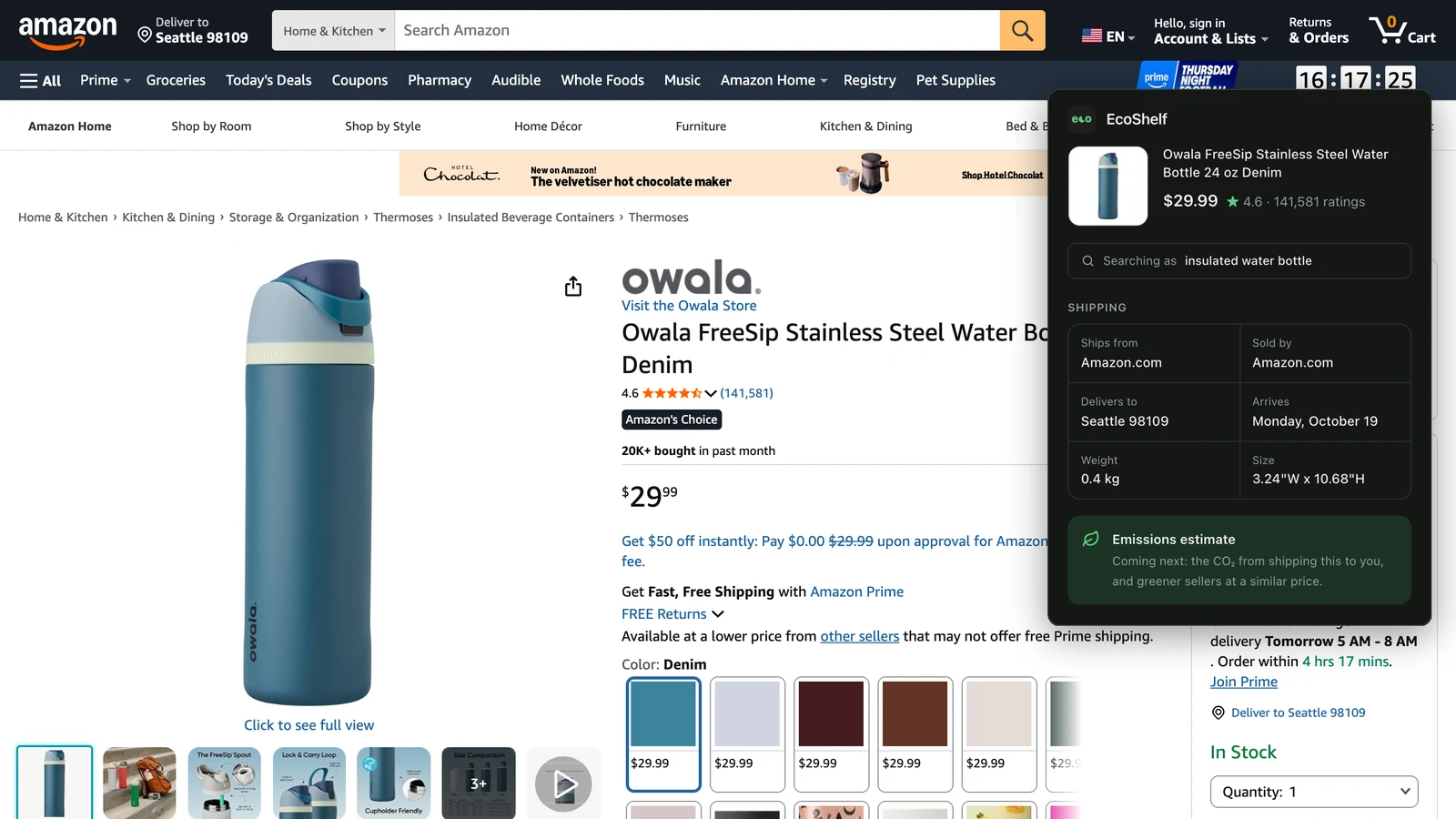
- A product-page scraper. On an Amazon product page, a content script collects the title, price, rating, review count, delivery destination and date, where the product ships from, who sells it, and the package and product weight and volume. Where it ships from and where it's going give the distance. Weight and volume give the load. Together, those are what an emissions estimate needs.
- A title-trimming API. An Amazon listing title is useless as a search term on other stores. A small Express server uses OpenAI to cut it down to a short, generic description of about five words that works for searching.
- The popup. A React and Tailwind popup shows the product, the search term, and its shipping details: where it ships from, who sells it, where it's going and when, and its weight and size. On any other page it asks you to open an Amazon product.
The search for alternatives and the emissions calculation itself weren't built before I paused the project.
How it works
The repo holds two separate Node projects. The extension, built with WXT, is just the popup: when you open it, it runs the scraper in the Amazon tab you're looking at. The backend exists for one reason only: to keep the OpenAI API key out of the extension, since anyone can read a browser extension's code.
Reading the page only when the popup opens means nothing runs on Amazon pages you're just browsing, and no OpenAI request goes out unless you ask. When a field can't be read, it comes back empty instead of failing, so a change to one part of Amazon's layout can't break the whole extension.
Tech stack
- WXT, React, TypeScript, and Tailwind CSS 4
- Express and Node
- OpenAI API
What I learned
- Keep the server as small as possible. The backend holds the API key and does one job.
- Scraping fails quietly. Falling back to empty values keeps the extension from crashing, but it also means a broken selector shows up as missing or wrong data, not as an error. So the scraper is now tested against saved Amazon pages, which show exactly which field broke when Amazon changes its layout.
Status
On hold. My friend stepped away from the project, and I haven't picked it back up on my own yet, but I may. The source is on GitHub.