
Notion Voice Assistant
- Vercel
- Claude API
- Notion API
- iOS Shortcuts
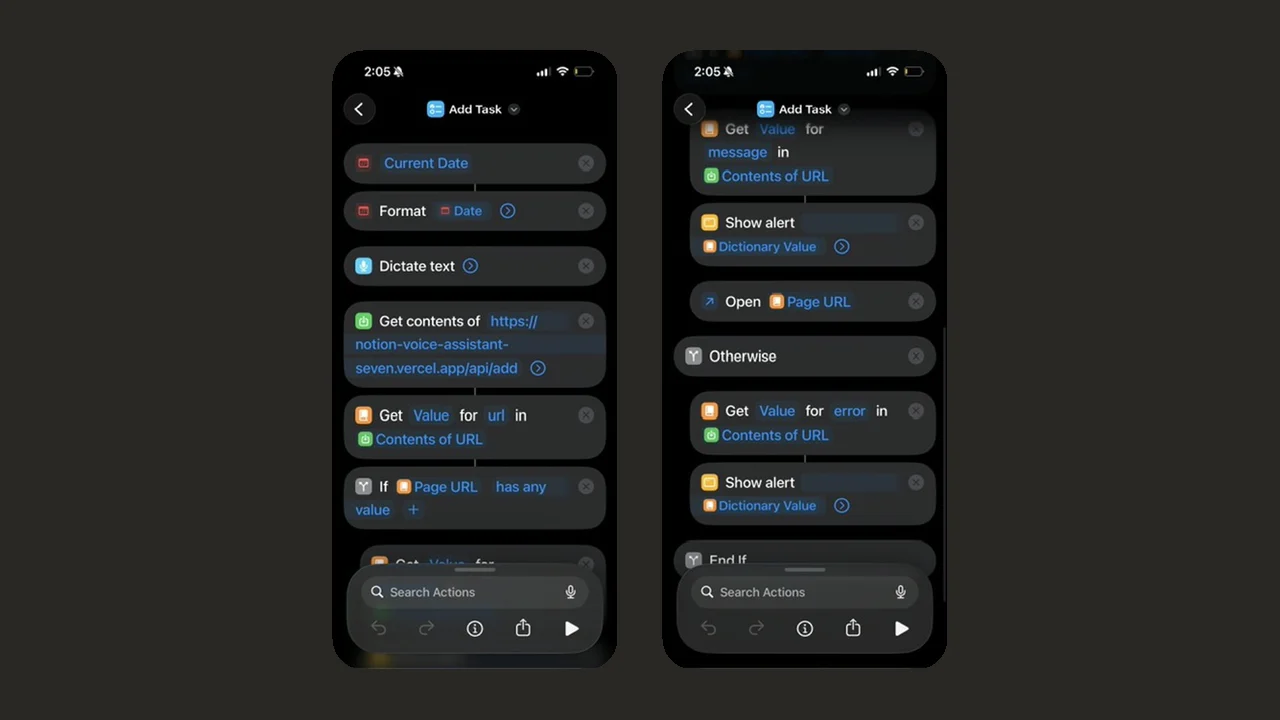
I dictate an assignment to an iOS Shortcut, and it lands in my Notion Assignments database as a filled-in page. A single serverless function has Claude pull out the name, label, and deadline, checks those in code, and works out the priority from the due date.
Overview
I track coursework, club work, and career tasks in a Notion database. With this, I can say something like "Visual literacy essay due Thursday at 3pm" and it gets filed correctly. The iOS Shortcut is the only client. It sends what I said, along with the phone's current local time, to one Vercel function. The Shortcut then shows a confirmation and can open the new page straight in the Notion app.
How it works
- The request is authenticated, and the dictated text is required.
- The date comes from the phone. The Shortcut sends its local time with its UTC offset. The server checks that it's within a day of its own clock. If it isn't, the server falls back to a default time zone. The response says which source it used, so a broken Shortcut shows up as a visible signal instead of a quietly wrong date.
- Claude Haiku parses the text into a name, a label, a start date and time, an end date and time, and notes. The time and end fields are filled only when I actually said them or they're implied.
- Code checks the output instead of trusting it.
- The label has to be one of my course codes or categories, or it becomes
Misc. - A deadline is date-only unless I said a time.
- An end is kept only if it comes after the start.
- A range with a time on only one side gets a start of midnight or an end of 11:59 pm.
- The label has to be one of my course codes or categories, or it becomes
- Priority is pure date math (
Past,Urgent, orDue Soon). The model is never asked for it. - The function creates the Notion page and returns a message for the Shortcut to show, plus a link that opens the page in the Notion app.
Tech stack
- One Vercel serverless function (Node, ESM, no dependencies)
- Anthropic API with Claude Haiku
- Notion API
- iOS Shortcuts
What I learned
- The model parses; code decides. If a model can drift on something when the prompt changes, it eventually will. Comparing dates and checking a value against a list are deterministic and free in code. So the model's only job is the one thing it's actually needed for: reading intent out of speech. If I asked it for the priority, getting that field right would be a prompt-tuning problem forever.
- Trust the client, but within limits. Computing "today" on the server made every "tomorrow" resolve against one fixed time zone, wherever I actually was. The phone knows the right answer. Real time zones are never more than a day away from UTC, so a one-day limit accepts every real date and stops a broken or stale one. When the phone's date is rejected, the function still files the task and flags it, instead of refusing. A dictation tool that files nothing over a bad date field is worse than one that's off by a day.
- Notion's API has sharp edges. A valid integration token still gets "not found" until the database is shared with the integration. Writing an unknown
selectvalue creates the option silently, while an unknownstatusvalue fails. Because of that, adding next semester's course codes needs no change on the Notion side.
Status
Live and in use since August 2026. At the start of each semester I update the list of course codes. The latest update added timed deadlines, end dates, and a link back to the new page.