
This Website
- Next.js
- TypeScript
- Tailwind CSS
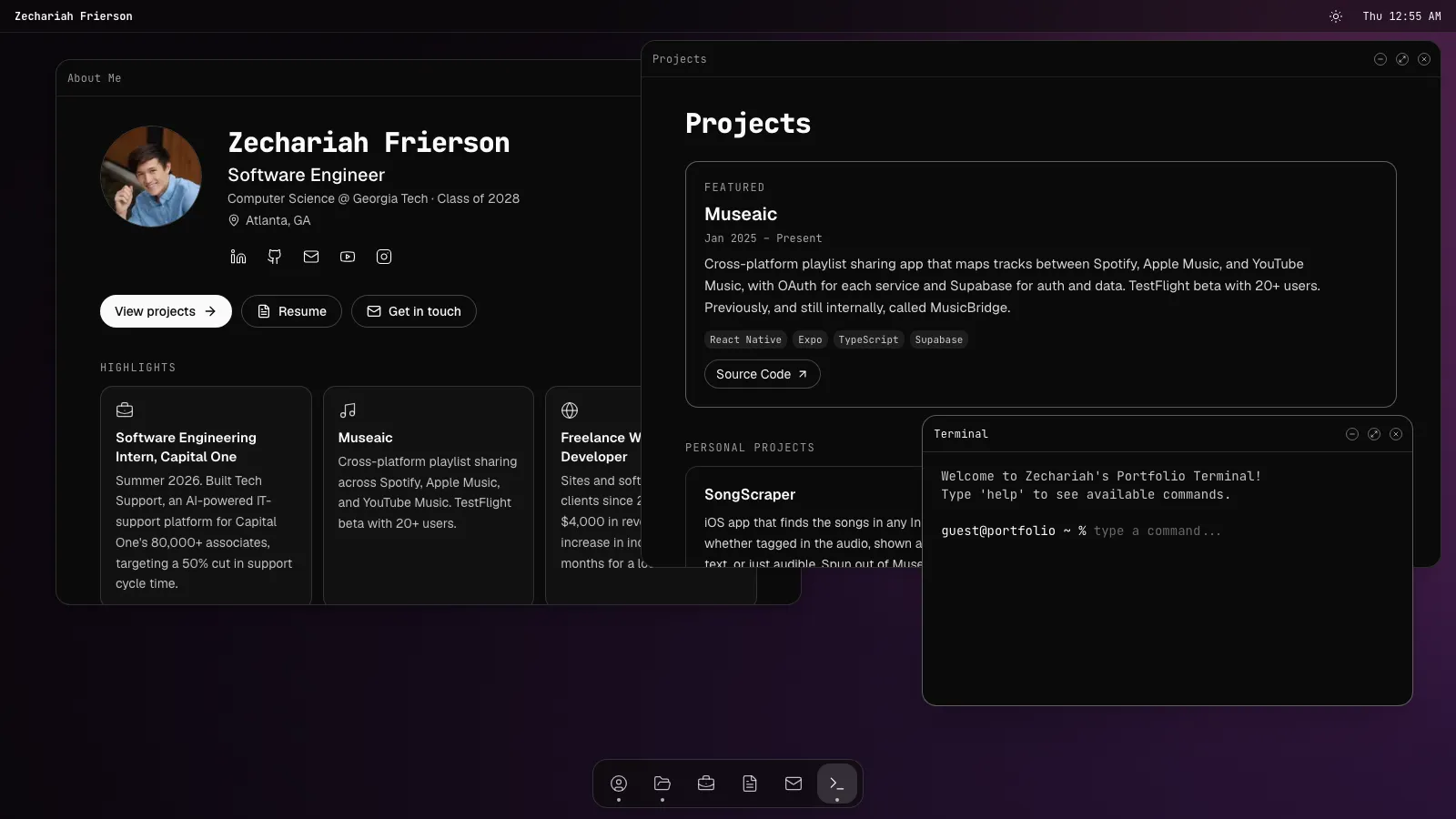
The site you're on is built like a desktop operating system. About, Projects, Experience, Resume, Contact, and Terminal are programs that open as windows, and you can drag, resize, snap, stack, minimize, and maximize them. Each window has its own URL. On a phone, each one opens full screen with a tab bar.
Overview
I started the site in May 2025 and have rebuilt it a few times since. The current version came out of an October 2026 audit of how the earlier tiling layout actually felt to use. On a 1280×720 laptop, five open windows ended up about 270px tall each. The taskbar had icons only, with labels that appeared only on hover. The URL never changed, so Back took you off the site. And the first screen didn't show my Capital One internship. I rebuilt it around floating windows that work like a real desktop.
What I built
- A window manager from scratch. Windows are draggable, resizable, and stack on top of each other. Dragging one to a side edge snaps it to half the screen, a corner snaps it to a quarter, and the top maximizes it, with a live preview while you drag. A half snap fills the other half with the window you used most recently. New windows go into any empty tile.
- A dock that lists every program and puts a dot under the running ones. Clicking the window in front minimizes it.
- URLs for every window, each with its own static page, so links and the Back button work.
- A separate phone model. Windows open full screen, with a tab bar and a home screen. Closing a window takes you home without losing its state.
- A contact form with a schema that the form and the API share, a hidden honeypot field that fakes success for bots, a rate limit, and plain-text email through Resend.
- Light and dark themes. The toggle reveals the new theme in a circle that expands from the button.
How it works
The page is a server component, so the content of About, Projects, Resume, and Contact is already in the prerendered HTML. That's good for crawlers, link previews, and recruiters skimming quickly. The page hands each program's content to a client-side Desktop, which owns the window state in a pure reducer. Each program renders only its content. The title bar, controls, and scrolling belong to one shared Window component, so a program doesn't know it's in a window.
Every window is a keyed, absolutely positioned child of a single stage. An earlier version used nested resizable panels whose structure depended on how many windows were open. Opening or closing one window rebuilt the tree and re-mounted every other window, which wiped the terminal's history and half-typed contact messages. With fixed slots, windows never re-mount, and layout changes animate smoothly as a bonus.
Window content uses container queries instead of viewport breakpoints, so a half-width window gets a layout that fits a half-width window.
Tech stack
- Next.js 16 (App Router), React 19, and TypeScript
- Tailwind CSS 4 with container queries, and shadcn/ui
- zod and react-hook-form
- Resend
- Playwright, run on desktop and mobile against a production build
What I learned
- No dead controls. The old mute button had no audio left to mute, so I removed it. Minimize and maximize now actually work.
- Test the real thing. The Playwright suite builds the production app and points Resend at a local mock, so the tests exercise the real contact route and never send real email.
- Light mode breaks quietly. Both themes are tested, including a contrast check on project cards.
On the production build, Lighthouse scored 94 for performance and 100 for accessibility, best practices, and SEO on mobile, and 100 for performance on desktop.
Status
Active. The source is on GitHub.